|
|

|
|
|
|
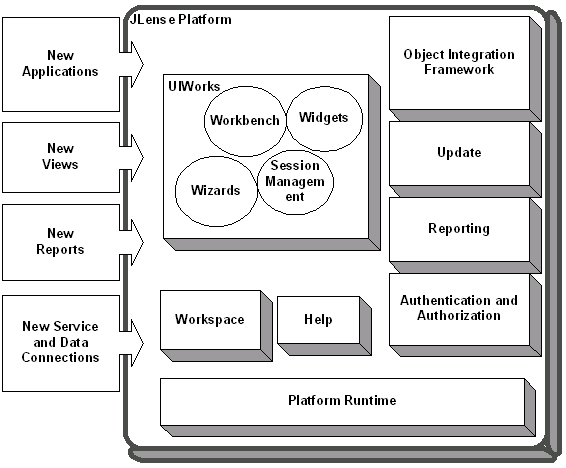
Platform ArchitectureThe JLense platform is structured around the concept of extension points. Extension points are well-defined places in the system where other tools (called plug-ins) can contribute functionality. Each major subsystem in the platform is itself structured as a set of plug-ins that implement some key function and define extension points. The JLense system itself is built by contributing to the same extension points that third party plug-in providers can use. Plug-ins can define their own extension points or simply add extensions to the extension points of other plug-ins. Most platform subsystems add extension points to the platform and provide APIs for extending their functionality. Some of these subsystems supply additional class libraries that do not directly relate to an extension point, but can be used to implement extensions. For example, the workbench UI supplies the UIWorks UI framework.
Defining an extension pointWhen you want to allow other plug-ins to extend or customize the functionality of your plug-in, you should define an extension point. As with extensions, the first step in defining an extension point is to add some markup to the plugin.xml file of your plug-in. Here is an example:
   <?xml version="1.0" ?>
   <plugin
      name="Simple Extension Point Plugin"
      id="org.jlense.sample"
      version="1.0">
      <runtime>
         <library name="extpt.jar" />
      </runtime>
      <extension-point
         name="Sample Extension Point"
         id="sampleExtensionPoint"/>
   </plugin>
That's all you have to do to define your own extension point. The structure of the extensions that connect to this extension point are not interpreted by the platform, but instead should follow a schema defined by the extension point provider. The only restriction is that the extension markup must be valid XML. Once you have defined your extension point, you can query the platform's plug-in registry at runtime to query and process any extensions that may exist. At runtime, the extensions are manifested as IExtension objects. Extensions in turn are made up of a tree of IConfigurationElement objects, one for each element in the extension markup. The following code snippet queries the plug-in registry for any extensions that are associated with the extension point we defined above.
   IPluginRegistry registry = Platform.getPluginRegistry();
   IExtensionPoint point = registry.getExtensionPoint("org.jlense.sample.sampleExtensionPoint");
   if (point != null) {
      IExtension[] extensions = point.getExtensions();
      System.out.println("Found " + extensions.length + " extensions");
   }
In simple cases, the only interaction between an extension point and its extensions is contained in the extension markup. The extension may provide some data or preference setting directly within the XML of the extension markup, and the extension point plug-in then reads and processes that information to provide some customized behaviour. Interacting with code in an extensionWith more advanced extension points, you may want to interact at runtime with objects defined by the extension. The trick here is that the plug-in that defines the extension point will typically know nothing about the names of classes and packages in the extension, so it must define an interface to describe the class structure it expects. Then, it can instantiate classes in the extension's plugin using an IExecutableExtension, and use the interface to interact with the object at runtime. To illustrate with an example, the following snippet from a plugin.xml file defines an extension that hooks into our sample extension point defined earlier.
   <extension
      name="Sample Extension"
      id="myExtension"
      point="org.jlense.sample.sampleExtensionPoint">
         <someObject>
            <run class="org.jlense.examples.SomeClass"/>
         </someObject>
   </extension>
This extension includes markup for an executable extension, which includes the name of the class to be instantiated. This class should conform to an interface defined by the plug-in that defined the extension point. As described earlier, the names of the tags in this example ("someObject" and "run") are arbitrary. These tags will be defined by the extension point schema. For this example, say the interface for the executable extension is called ISomeInterface. The following code snippet in the extension point's plugin will query the plugin registry, and instantiate all executable extensions for the extension point "sampleExtensionPoint".
   IPluginRegistry registry = Platform.getPluginRegistry();
   IExtensionPoint point = registry.getExtensionPoint("org.jlense.sample.sampleExtensionPoint");
   IExtension[] extensions = point.getExtensions();
   for (int i = 0; i < extensions.length; i++) {
      IConfigurationElement[] elements = extensions[i].getConfigurationElements();
      for (int j = 0; j < elements.length; j++) {
         if ("someObject".equals(elements[j].getName())) {
            ISomeInterface object = (ISomeInterface)elements[j].createExecutableExtension("run");
            System.out.println("Found an executable extension: " + object);
         }
      }
   }
That's all there is to it! For more information, browse the javadoc for the org.eclipse.core.runtime package. The best example of all is to look at the extension points defined by the JLense platform itself. JLense Platform roadmapRuntime coreThe platform runtime core implements the runtime engine that starts the platform base and dynamically discovers plug-ins. A plug-in is a structured component that describes itself to the system using a manifest(plugin.xml) file. The platform maintains a registry of installed plug-ins and the function they provide. Function is added to the system using a common extension model. Extension points are well-defined function points in the system that can be extended by plug-ins. When a plug-in contributes an implementation for an extension point, we say that it adds an extension to the platform. Plug-ins can define their own extension points, so that other plug-ins can integrate tightly with them. The extension mechanisms are the only means of adding function to the platform and other plug-ins. All plug-ins use the same mechanisms. Plug-ins provided with the JLense platform do not use any private mechanisms in their implementation. Extensions are typically written in Java using the platform APIs. However, some extension points accommodate extensions provided as platform executables. In general, only a subset of the full platform function is available to non-Java extensions. A general goal of the runtime is that the end user should not pay a memory or performance penalty for plug-ins that are installed, but not used. A plug-in can be installed and added to the registry, but the plug-in will not be activated unless a function provided by the plug-in has been requested according to the user's activity. The best way to get a feel for the runtime system is to build a plug-in. See Plug it in: Hello World meets the workbench to get started by building a plug-in. Once you have mastered the basics of plug-in writing and you're ready to define your own extension points, see Defining an extension point. Resource managementThe resource management plug-in defines a common resource model for managing plugin-in artifacts. Plug-ins can create and modify folders, and files, as well as define specialized types of resources. Introduction to resources provides an overview of the resource management system. Workbench UIThe workbench UI plug-in implements the workbench UI and defines a number of extension points that allow other plug-ins to contribute menu and toolbar actions, dialogs, wizards, and custom views. Plugging into the workbench introduces the workbench UI extension points and API. The workbench UI plug-in also provides frameworks that are useful for user interface development. These frameworks were used to develop the workbench itself. Using the frameworks not only eases the development of a plug-in's user interface, but ensures that plug-ins have a common look and feel and consistent level of workbench integration. The workbench is built using Java Foundation Classes. The UIWorks UI framework provides higher-level application constructs for supporting dialogs, wizards, actions, user preferences, and session management. The functionality in UIWorks is described in Dialogs and wizards, Preferences and properties, and UIWorks: UI framework for plug-ins. Object Integration FrameworkThe Object Integration Framework plugin defines an abstract, interface-based, API which plugins can use to select, store, and delete objects that have been published by other plugins and to make procedure calls published by other plugins. The Object Integration Framework is described in Accessing Data and Services. Help SystemThe Help plug-in integrates Java Help into the JLense workbench. It defines extension points that plug-ins can use to contribute help or other plug-in documentation. The help facility is described in Plugging in help. |